Automated DSA Page Feed
Build and maintain a high-quality DSA page feed automatically from your store—then fine-tune URLs and labels manually like you do with Shopping labels.
Export as a Google Ads page feed and target by labels (e.g., Best Sellers, Unicorns) for tighter DSA control.
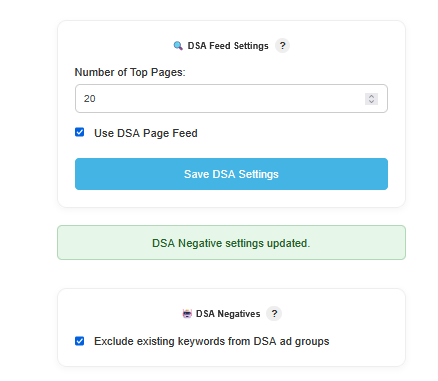
How it works
Generate a structured URL list with labels from your site, refine it like a spreadsheet, then import to Google Ads to steer DSA targeting and budgets toward your top performers.
Auto-build from your catalog
Pull eligible product and category URLs from your store (or sitemap) and enrich with titles, page type, and default labels (e.g., Product, Collection, Brand).
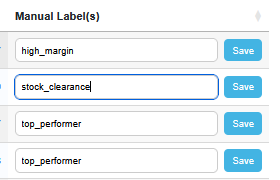
Edit URLs, labels & exclusions
Adjust rows in a fast inline editor: fix URLs, add labels (e.g., Best Seller, Unicorn, New In), or exclude pages. Manual overrides are preserved on refresh.
Mirrors your Shopping label workflow so teams have a consistent editing experience.
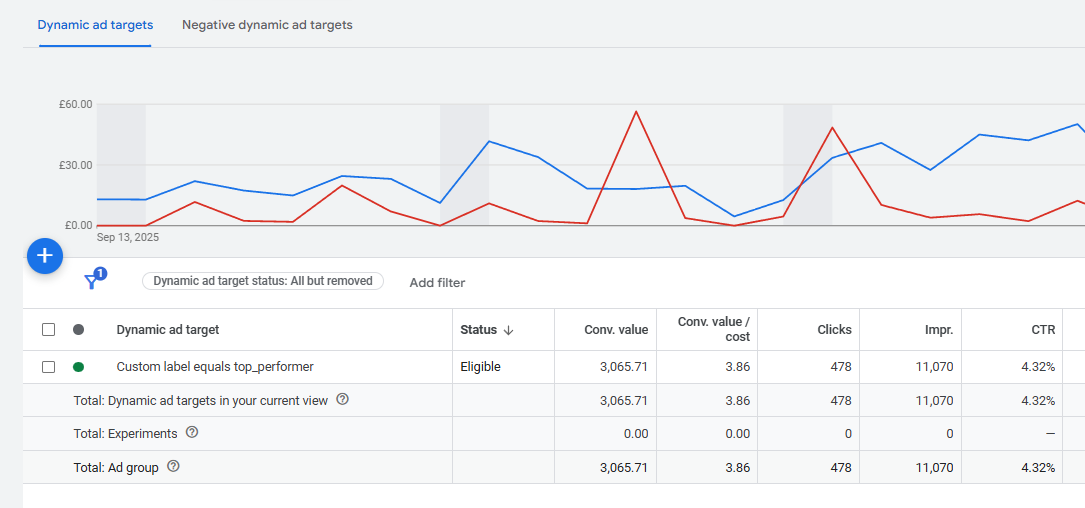
Target by labels in DSA
Export your feed and import it into Google Ads as a Page feed. Build ad group targets by labels—e.g., Best Sellers in their own ad group with higher bids, Unicorns in a top-tier campaign.
Use labels to mirror your structure: Best Sellers / Unicorns / Clearance / Seasonal—each with tailored bids and messaging.
Explore other features
Extend your protection and automation across Shopping, feeds, and reporting — all from one dashboard.